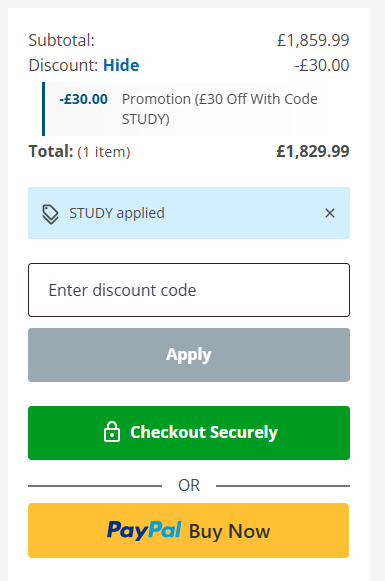
How to use a musicMagpie voucher code
- Choose the current offer you want to use above.
- Select Show Code and copy the voucher.
- Add the qualifying product to your musicMagpie basket.
- Go to checkout.
- Enter the voucher or promotional code.
- Apply it.
- Check the new basket total before paying.
If the discount hasn't appeared, check the conditions before completing your order.
musicMagpie states that a promotional discount cannot normally be added retrospectively once the order has already been completed.
musicMagpie student discount
musicMagpie currently advertises 10% off qualifying refurbished tech and pre-owned entertainment for eligible students.
That is worth checking before using a normal voucher.
On a qualifying £300 device:
10% off = £30
On a qualifying £500 device:
10% off = £50
For higher-value refurbished phones, laptops or tablets, a 10% eligibility discount can be much more useful than a small fixed-value voucher.
You'll need to verify your eligibility through the relevant service.
musicMagpie Blue Light discount
- Eligible Blue Light Card holders can currently receive 10% off tech and entertainment at musicMagpie.
- The maximum discount is currently £50.
- The offer covers eligible Blue Light members including people working in areas such as the NHS, emergency services, social care and armed forces.
- A valid Blue Light code is required.
- The Blue Light offer cannot currently be combined with another voucher code.
- If you have a public musicMagpie voucher as well, work out which one saves more before checking out.
Which musicMagpie saving should you check first?
That depends on what you're buying.
Someone ordering a refurbished iPhone has very different things to compare from someone buying three used DVDs.
For tech, start by checking:
- the current voucher
- the condition grade
- any student or Blue Light discount you qualify for
- the value of your old device if you're replacing one
- whether the model has different storage options
For entertainment, look at the current multibuy or category promotions as well as voucher codes.
The cheapest route isn't always the code with the biggest percentage.
Buying refurbished tech? Compare the condition grades first
musicMagpie grades its refurbished tech as:
Pristine
Very Good
Good
These grades are mainly about cosmetic condition rather than whether the device works.
A Pristine device should have the cleanest appearance.
Very Good devices may show light signs of previous use.
Good devices can have more noticeable cosmetic marks.
All of the grades go through musicMagpie's testing and refurbishment process.
That means the main question is often:
How much do you care about scratches or signs of use?
If you're putting the phone straight into a protective case, paying considerably more for Pristine condition may not always be worthwhile.
Is Pristine worth paying extra for?
Not necessarily.
Imagine the same phone is available as:
Pristine – £399
Very Good – £359
Good – £329
The difference between Pristine and Good is £70.
If appearance matters a lot to you, that extra cost may be reasonable.
If the phone is going into a case on the first day, you may prefer to keep the £70.
This is why it is worth comparing grades before spending time looking for another £5 or £10 voucher.
The condition choice itself can be one of the biggest savings available.
What does musicMagpie check on refurbished phones?
musicMagpie says its refurbished mobile phones are tested using PhoneCheck software.
The process checks phones for a wide range of potential faults, including their functionality and battery information.
Devices are also checked during the refurbishment process before being listed for sale.
The condition grade tells you how the device looks.
It doesn't mean a Good device has fewer working features than a Pristine one.
That distinction is useful when comparing prices.